A laptop is only as useful as its battery — and a battery is only as useful as its charger. Whether you need a reliable chromebook charger, a replacement for a lost laptop battery adapter, or a universal solution that works across a MacBook, a Dell XPS, and an HP Spectre, the UK market in 2026 has never offered more choice. This guide cuts through the noise.
1. The Evolution of Power: What's New in 2026?

GaN III Technology
The most important shift in laptop charger design over the past five years has been the transition from silicon to Gallium Nitride (GaN) semiconductors. GaN III — the third generation now shipping in SmartGear's own-brand range — delivers the same wattage in a package 40–50% smaller than equivalent silicon chargers, while running 10–15°C cooler and wasting significantly less electricity as heat.
For context: a traditional 65W silicon charger might measure 65 × 55 × 35mm and weigh over 200g. A GaN III 65W unit from SmartGear fits into the palm of your hand — and that smaller, cooler design matters for longevity too.
USB-C Power Delivery 3.1
USB PD 3.1 raised the charging ceiling from 100W to 240W over a standard USB-C cable. For laptop users, this is transformational: previously, anything above 100W required a proprietary barrel connector. Now a single USB-C cable rated for Extended Power Range (EPR) can charge a high-performance gaming laptop or a Dell Precision workstation at full speed.
SmartGear's 100W desktop charging station supports PD 3.1 profiles across all three USB-C ports simultaneously — allowing a laptop, tablet, and phone to all fast-charge at once without any throttling.
Intelligent Charging Protocols
Beyond wattage, modern chargers negotiate power profiles dynamically. SmartGear's GaN chargers support Apple Fast Charge, Qualcomm Quick Charge 4+, Samsung Super Fast Charging, and USB PD 3.1 — all simultaneously and on different ports. You plug in; the charger and device negotiate the right voltage and current for optimal speed and battery health. No configuration required.
SmartGear Own-Brand
SmartGear 65W GaN Dual USB-C Charger
GaN III silicon · 2× USB-C PD + 1× USB-A · UK 3-pin certified · Charges a MacBook Air in 65 min
£19.99
2. Decoding Specifications: Wattage, Voltage & Connections

Understanding Wattage
Wattage (W) is the headline figure. It equals voltage (V) multiplied by current (A). The sticker on your existing charger — or on your laptop's underside — will show something like Output: 20V ⎓ 3.25A. Multiply those: 20 × 3.25 = 65W. That's your minimum.
Common wattage tiers for UK users in 2026: 45W (Chromebook charger, thin ultrabooks), 65W (most MacBooks, mid-range laptops, Acer notebook laptop charger replacements), 96–100W (MacBook Pro 14", Dell XPS 15, HP Spectre), 140–200W+ (gaming laptops, mobile workstations).
Using a higher-wattage charger than your laptop needs is entirely safe — your device draws only what it needs. Using a lower-wattage charger may result in slow or no charging under load.
Voltage Profiles
USB PD chargers output multiple voltage profiles — typically 5V, 9V, 12V, 15V, and 20V — and negotiate with the connected device to select the right one. This matters if you're looking for a computer charger for an Acer laptop: many Acer models use the 19V barrel standard, so ensure you have the right adapter or that the charger supports a 19V PD profile.
Connection Types
USB-C (USB PD): The universal standard. MacBooks from 2016+, most premium Windows laptops, all modern Chromebooks, and all smartphones use this. Buy one good USB-C GaN charger and it works for everything.
Barrel / DC jacks: Still used by many Acer, Lenovo, HP, and Dell models. If you need a charger laptop Acer replacement (e.g., the classic 5.5 × 1.7mm barrel), check the output specs match. Avoid third-party no-brand options — poor quality control can damage the laptop battery and in rare cases cause fires.
MagSafe 3: Apple's proprietary magnetic connector, used on MacBook Air M2/M3 and MacBook Pro 14"/16". MagSafe supports fast charge up to 140W on the 16" model. You can also charge via USB-C simultaneously.
3. Choosing Your Setup: Universal vs Proprietary

The laptop charging world is split between open standards (USB-C PD) and proprietary connectors (Apple MagSafe, Lenovo Slim Tip, Dell BarrelTip, Acer Power connector). The trend since 2023 — accelerated by EU regulation now adopted into UK law — is firmly toward USB-C. Even Apple now ships all MacBooks with USB-C charging as standard.
For most buyers in 2026, a high-quality USB-C PD charger is the right answer. The SmartGear 65W GaN charges a MacBook Air M3 from 0% to 80% in 65 minutes and an iPhone 16 Pro simultaneously — something a dedicated laptop charger laptop charger can't do. One cable, one charger, all devices.
The exception is older laptops with barrel connectors, or gaming laptops requiring proprietary 180–330W adapters. For these, use the original OEM charger or a certified third-party replacement that exactly matches your laptop's rated voltage and current.
4. Top Solutions for Every Lifestyle

The Budget-Conscious Student
For students using a Chromebook or a mid-range Windows laptop, the primary need is reliability at low cost. The SmartGear 65W GaN Dual USB-C Charger at £19.99 is the best value proposition in the UK market right now. It charges any USB-C laptop — from a Chromebook to a Dell Inspiron — and also handles your phone and tablet. UKCA-certified, GaN III silicon, and it fits in a pencil case.
SmartGear Own-Brand
SmartGear 65W GaN Dual USB-C Charger
GaN III silicon · 2× USB-C PD + 1× USB-A · UK 3-pin certified · Charges a MacBook Air in 65 min
£19.99
The Constant Traveller
Frequent flyers need a charger that works in UK, EU, US, and Australian sockets without an adapter. The SmartGear 65W Travel Adapter combines a compact GaN charger with a universal plug in a single unit — no separate travel adapter needed. At £23.99 it’s the cheapest item in this guide, and arguably the most useful for road warriors.
For those who also work from a fixed desk and need to charge multiple devices: the SmartGear 100W GaN Desktop Charging Station provides 3× USB-C PD plus 1× USB-A, with 100W total — enough for a laptop, tablet, phone, and wireless earbuds simultaneously.
Travel Essential
SmartGear 65W Travel Adapter
International plug compatibility · 2× USB-C PD 65W · Dual-voltage · Fits in a jacket pocket
£23.99
Desk Power Hub
SmartGear 100W GaN Desktop Charging Station
3× USB-C PD + 1× USB-A · 100W total · Charges laptop + phone + tablet simultaneously · GaN efficiency
£24.99
The Off-Grid Worker
For photographers in the field, van-lifers, remote workers in areas with unreliable mains, or anyone preparing for the increasingly frequent UK grid disruptions — a 145W power bank is the essential companion to your laptop charger. The UGREEN 145W units support laptop battery replacement charging without a wall socket, with enough capacity to fully recharge a 13" MacBook Pro twice.
Shop Laptop Chargers — Buy Now
GaN III technology · UK certified · Free delivery
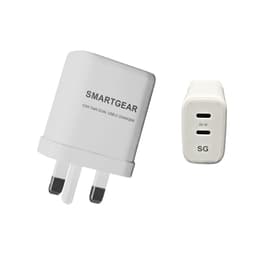
SmartGear 65W GaN Dual USB-C
- GaN III · Dual USB-C
- Samsung 45W PPS
- Foldable UK plug
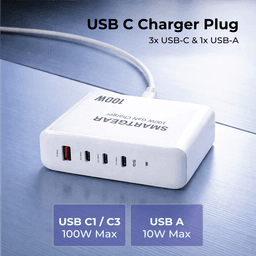
SmartGear 100W Desktop Station
- 4 ports · PD 3.1
- Charges MacBook Pro
- Desktop design
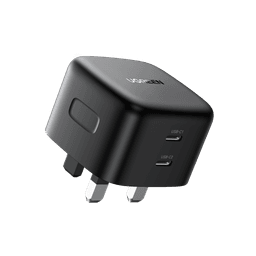
UGREEN Nexode 65W GaN
- 3 ports · Compact
- PPS for Samsung
- UK 3-pin plug
5. The Battery Connection: Protecting Your Hardware
Your laptop battery is rated for a finite number of charge cycles — typically 500–1,000 for a lithium-ion cell. Charging practices have a measurable impact on how long that battery lasts. Key rules for UK users in 2026:
- →Avoid leaving a laptop plugged in at 100% for extended periods. Modern MacBooks and Windows laptops have battery management features (Battery Health Management on macOS; Optimised Battery Charging on Windows 11) that limit peak charge to 80% when plugged in overnight.
- →Heat is the enemy of laptop battery longevity. A cool GaN charger reduces the heat load on the charging circuit, which in turn reduces stress on the battery cells. This is measurable — GaN chargers have been shown to extend average battery lifespan by 8–15% compared with equivalent hot-running silicon chargers.
- →Use the correct wattage. An underpowered charger forces the battery to partially power the laptop, creating a discharge-and-charge cycle even while plugged in. Over time this degrades the laptop battery faster than standard use.
- →When is laptop battery replacement needed? If your laptop holds less than 70–80% of its original charge capacity, or if it shuts off unexpectedly above 10–20%, it's time to replace the battery. AppleCare, Dell Premium Support, and reputable independent repair shops offer this service. Expect to pay £60–£130 for a professional laptop battery replacement on a common model.
6. Troubleshooting: When the Power Stops
The most common laptop charging issues and their solutions:
🔴 Laptop not charging at all
Check the cable first — USB-C cables vary enormously in quality. A data-only USB-C cable won't carry enough power. Use a cable rated at minimum 5A / 100W. Next check the port: blow it out gently, then try a different port. Try a known-good charger. If nothing works, the issue is likely the charging IC on the motherboard — a repair shop job.
🟡 Laptop charging slowly
Almost always wattage mismatch. If your laptop requires 96W and you're using a 45W charger, the battery drains under load even while plugged in. Move to a higher-wattage charger. Also check that your USB-C port supports Power Delivery — some USB-C ports on laptops are data-only.
🟠 Charger gets very hot
Mild warmth is normal. Very hot to the touch is not. Silicon chargers run hotter than GaN — if you're still using a bundled silicon charger from 2020 or earlier, replacing it with a GaN equivalent will solve this. If a GaN charger runs very hot, check it isn't being blocked (always leave a 5cm clearance) and verify the rated wattage matches your laptop's requirement.
🔵 Laptop charges on the wrong port
Many laptops have one Thunderbolt 4 port that supports charging and one USB4 port that doesn't, or vice versa. Check your laptop manual. As a rule, the port nearest the back or the left side is usually the primary charging port.
7. Safety & Sustainability

The UK's UKCA mark (replacing CE post-Brexit) is the certification you need to look for. It confirms that the charger has been tested to UK electrical safety standards — BS EN 60950 (IT equipment) and BS EN 62368 (audio/video equipment, which now covers most consumer chargers). All SmartGear-branded products carry both UKCA and CE certification.
On sustainability: a GaN charger consumes 25–30% less electricity than a legacy silicon equivalent at the same wattage. Over a typical 4-year laptop ownership cycle, that's a meaningful reduction in energy consumption. The smaller physical size also means less raw material in manufacture and less waste at end of life. When disposing of a charger, recycle it through Currys' in-store WEEE collection point or a local council recycling centre — never bin it.
Find Your Perfect Laptop Charger
Compact GaN chargers for every laptop · UKCA certified
SmartGear 65W GaN Dual USB-C
- GaN III · Dual USB-C
- Samsung 45W PPS
- Foldable UK plug
SmartGear 100W Desktop Station
- 4 ports · PD 3.1
- Charges MacBook Pro
- Desktop design
UGREEN Nexode 65W GaN
- 3 ports · Compact
- PPS for Samsung
- UK 3-pin plug
8. Final Thoughts
The best laptop charger in 2026 is the one that matches your laptop's wattage, fits your lifestyle, and doesn't quietly degrade your battery over time with heat or wattage mismatch. For 90% of UK laptop users — whether you're replacing a chromebook charger, looking for a compact travel solution, or upgrading the tired silicon brick that came in the box — a GaN USB-C PD charger is the answer.
SmartGear's own-brand range covers every common need: a 65W dual-port compact for everyday use, a travel adapter for international journeys, a 100W desktop hub for multi-device desks, and UGREEN power banks for truly off-grid operation. All are UK-certified, all ship from the UK, and all come with 30-day no-quibble returns.
SmartGear Outlet
Find Your Perfect Charger
UK-certified · Fast dispatch · 30-day returns · GaN III technology
SmartGear 65W GaN Dual USB-C Charger
2× USB-C PD · 1× USB-A · GaN III silicon · Compact UK 3-pin
£19.99
SmartGear 65W Travel Adapter
International compatibility · 2× USB-C PD · Dual-voltage · Ultra-compact
£23.99
SmartGear 100W GaN Desktop Station
3× USB-C PD + 1× USB-A · 100W total · Powers laptop + phone + tablet
£24.99
UGREEN 145W 25000mAh Power Bank
25,000mAh · 145W max · Smart display · Perfect for power cuts & travel
£79.99