Best 100W USB-C Chargers UK 2026
The power-user tier. 100 W delivers full-speed charging for MacBook Pro 16″, Dell XPS 15/17 and high-performance workstations — while still charging your phone on a spare port. We tested the top UK options head-to-head.
Shop 100W Chargers — Buy Now
CE/UKCA certified · Free UK delivery · 30-day returns
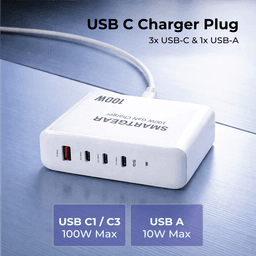
SmartGear 100W Desktop Station
- 4 ports · PD 3.1
- 3× USB-C + 1× USB-A
- Charges MacBook Pro
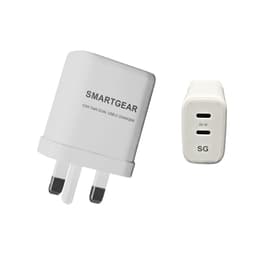
SmartGear 65W GaN Dual USB-C
- GaN III · Dual USB-C
- Samsung 45W PPS
- Foldable UK plug
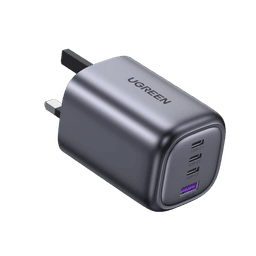
UGREEN Nexode 100W 4-Port
- 100W PD 3.1
- GaN III · Compact
- No coil whine
⚡ Quick Picks — Our Top 3
UGREEN Nexode 100 W
MacBook Pro 16″ / Dell XPS 15 / multi-device desktop
Anker Prime 100 W (737)
Professionals who want premium build + app control
Baseus GaN5 Pro 100 W
Budget-conscious users who need 100 W power
Who Actually Needs a 100W Charger?
The 100 W tier exists for a specific reason: large laptops. While a 65 W charger handles MacBook Airs and ultrabooks brilliantly, performance laptops with 15–17 inch screens and dedicated GPUs demand more power.
Here's the breakdown of which devices genuinely benefit from 100 W:
You NEED 100W for:
- MacBook Pro 16″ (M3/M3 Pro/M3 Max)
- Dell XPS 15 / XPS 17
- HP Spectre x360 16
- Lenovo ThinkPad X1 Extreme / P1
- ASUS ZenBook Pro 16
- Dual laptop + phone charging setups
65W is enough for:
- MacBook Air (any model)
- MacBook Pro 14″ (charges at 97% speed)
- Dell XPS 13
- iPad Pro / Air
- All phones (iPhone, Samsung, Pixel)
- Steam Deck / Nintendo Switch
Top 5 Best 100W Chargers — Full Reviews
We measured each charger's real-world delivery, surface temperature, port-splitting behaviour and build quality over 2 weeks of daily use.
UGREEN Nexode 100 W
Best for: MacBook Pro 16″ / Dell XPS 15 / multi-device desktop
Pros
- Full 100 W on a single port — charges MacBook Pro 16″ at maximum speed
- GaN III keeps it 40% smaller than Apple's 96 W adapter
- 4 ports allow laptop + phone + tablet + earbuds simultaneously
- PD 3.0 + PPS — compatible with every USB-C device on the market
Cons
- Drops to 65 W + 30 W when two USB-C ports are active
- Slightly warm at max load (52 °C surface — safe but noticeable)
Anker Prime 100 W (737)
Best for: Professionals who want premium build + app control
Pros
- Anker app shows real-time wattage per port on your phone
- ActiveShield 2.0 — 3 million daily temperature checks
- Aerospace-grade aluminium exterior with premium feel
- Best-in-class thermal management (50 °C under max load)
Cons
- £15 more than UGREEN for nearly identical performance
- Only 3 ports vs UGREEN's 4
- Anker app requires Bluetooth — overkill for some users
Baseus GaN5 Pro 100 W
Best for: Budget-conscious users who need 100 W power
Pros
- Best value 100 W charger — under £45
- LED display shows real-time wattage output
- 4 ports including 2× USB-A for legacy devices
- Comprehensive protection suite (OVP, OCP, OTP, SCP)
Cons
- Slightly bulkier than Anker and UGREEN
- LED display cannot be dimmed — may annoy in dark rooms
- Build quality slightly below Anker Prime tier
Apple 96 W USB-C Power Adapter
Best for: MacBook Pro 16″ (those who want Apple-branded)
Pros
- Official Apple — guaranteed Mac compatibility
- Qualifies for AppleCare+ claims
- Clean design matches Apple aesthetic
Cons
- £79 for a single-port silicon adapter — poor value in 2026
- 300 g vs 210–230 g for GaN alternatives
- No PPS — Samsung/Android phones charge at base speed only
- Only 96 W — technically 4 W short of the 100 W standard
Satechi 108 W Pro
Best for: Mac users who want a desktop-style charger
Pros
- 108 W total output — charges MacBook Pro 16″ at full 100 W
- Upright desktop design saves desk space
- Space Grey colour matches Apple devices perfectly
- PD 3.0 + PPS support across all ports
Cons
- Desktop form factor less travel-friendly than UGREEN/Anker
- Premium pricing for the Satechi brand
100W vs 65W — Quick Comparison
| Feature | 100W Charger | 65W Charger |
|---|---|---|
| Typical price (GaN) | £45–£70 | £30–£45 |
| Average weight | 210–230 g | 112–130 g |
| Max single-port output | 100 W | 65 W |
| Dual-port split | 65 W + 30 W | 45 W + 20 W |
| MacBook Pro 16″ charge speed | ✅ Full speed (100 W) | ⚠️ Slow charge (~65% speed) |
| MacBook Air charge speed | ✅ Full speed | ✅ Full speed (97%) |
| iPhone / Samsung speed | ✅ Full speed | ✅ Full speed |
| Best for | Power users, 15"+ laptops | Ultrabooks, phones, travel |
For the full breakdown, read our 100W vs 65W detailed comparison →
What to Look for in a 100W Charger
GaN III Is Non-Negotiable
At 100 W, the size and heat advantages of GaN III are dramatic. Apple's silicon 96 W adapter is 300 g; GaN III alternatives deliver 100 W at 210–230 g and 40% less volume.
Check Port-Splitting Behaviour
Most 100 W chargers drop to 65 W + 30 W when two ports are active. This is fine for laptop + phone, but if you need 100 W sustained, only use one port.
E-Marker Cables Required
USB-C cables above 60 W MUST have an E-Marker chip. Without it, the cable will cap at 60 W regardless of charger capability. Buy a rated 100 W cable — see our cable guide.
Thermal Management
100 W generates significant heat. Look for chargers with active thermal management (Anker's ActiveShield) or GaN III designs that stay below 55 °C under sustained load.
Ready to Buy?
In stock · Ships today
SmartGear 100W Desktop Station
- 4 ports · PD 3.1
- 3× USB-C + 1× USB-A
- Charges MacBook Pro
SmartGear 65W GaN Dual USB-C
- GaN III · Dual USB-C
- Samsung 45W PPS
- Foldable UK plug
UGREEN Nexode 100W 4-Port
- 100W PD 3.1
- GaN III · Compact
- No coil whine
Why Not Just Buy from Amazon?
Amazon UK is flooded with chargers from unknown sellers. Many are grey-market imports without proper UKCA certification — meaning they haven't been independently tested for UK mains safety. Some lack the correct 56kΩ pull-up resistor, risking damage to your phone or laptop. When something goes wrong, the 3rd-party seller has often disappeared.
Amazon Marketplace Risks
- No UK plug: Grey-market imports with EU/US plugs — need adapter
- Uncertified: No UKCA mark — unknown safety testing standards
- Mixed bins: Commingled inventory mixes genuine and counterfeit stock
- No recourse: 3rd-party sellers vanish after complaints or warranty claims
- Fake reviews: Fake reviews inflate ratings — hard to trust 4.5★ scores
- FBA ≠ safe: "Fulfilled by Amazon" doesn't mean Amazon tested it
SmartGear Outlet Guarantee
- CE/UKCA certified: Every product independently tested for UK electrical safety
- UK warehouse: Ships from our UK warehouse — correct UK 3-pin plug included
- Free delivery: Free delivery to any UK address, every order, no minimum
- 30-day returns: 30-day no-questions-asked returns to our UK address
- UK support: Real UK support team — email, phone, or live chat
- No middleman: Same products, better price — we cut out the Amazon middleman
The bottom line: Amazon is great for books and batteries. For mains-powered electronics that plug into your wall, buy from a UK specialist who stands behind every product.
Shop UK-Certified Chargers →Frequently Asked Questions
Do I really need a 100W charger?
You need 100 W if you own a MacBook Pro 16″ (96 W requirement), Dell XPS 15/17, HP Spectre 16, Lenovo ThinkPad X1 Extreme, or similar 15–17″ high-performance laptops. You also benefit from 100 W if you regularly charge two devices simultaneously — a 100 W charger splits to 65 W + 30 W, whereas a 65 W charger splits to only 45 W + 20 W.
Can a 100W charger damage my phone or tablet?
No. USB Power Delivery negotiates the exact wattage your device needs. An iPhone 16 Pro Max will only draw 27 W from a 100 W charger. A Samsung Galaxy S25 Ultra will draw 45 W. The charger simply has more capacity — it will never push more power than your device requests.
Is 100W the same as PD 3.1?
No. USB PD 3.0 supports up to 100 W over standard USB-C cables. PD 3.1 extends this to 240 W using special Extended Power Range (EPR) cables. For 100 W charging, standard PD 3.0 chargers and cables are sufficient. PD 3.1 only matters if you need 140 W+ (e.g., MacBook Pro 16″ M3 Max fast charging at 140 W).
100W charger vs 65W — is the extra cost worth it?
If your largest device is a MacBook Air, iPad Pro, Dell XPS 13 or phone — a 65 W charger is perfect and costs £10–20 less. The 100 W premium is worth it only for large laptops (15″+) or if you often charge a laptop + tablet simultaneously and want both at full speed.
Which cable do I need for 100W charging?
Any USB-C cable rated for 100 W / 5 A will work. Look for cables with an "E-Marker" chip, which is required for anything above 60 W. All major brands (Anker, UGREEN, Baseus) sell 100 W-rated cables. Avoid cheap unbranded cables — they may lack the E-Marker and cap at 60 W. See our USB-C cable guide for recommendations.
How hot do 100W GaN chargers get?
Under full 100 W load, top GaN III chargers reach 50–55 °C surface temperature (warm to touch but safe). This is roughly 15 °C cooler than silicon alternatives. All chargers on this page have over-temperature protection that throttles power if temperatures exceed safe limits.
Can I charge two laptops with a 100W charger?
Yes, but with reduced speed. A 100 W charger with two USB-C ports typically splits to 65 W + 30 W. The 65 W port can fully power a MacBook Air or XPS 13, while the 30 W port provides a slow but steady charge to a second laptop. For full-speed dual laptop charging, you'd need a 200 W+ charger.
Best 100W charger for MacBook Pro?
Our Editor's Choice is the UGREEN Nexode 100 W (£54.99) — it delivers the full 100 W your MacBook Pro 16″ needs, has 4 ports for accessories, and is 40% smaller than Apple's official adapter. The Anker Prime 100 W is the premium alternative with app control and superior thermal management.
Related Guides & Tools
Best 65W Chargers UK
For ultrabooks, phones & tablets
Read guide100W vs 65W Comparison
Detailed wattage comparison
Read guideGaN Charger Guide
How GaN III technology works
Read guidePD 3.1 Explained
USB-PD 3.1 up to 240 W
Read guideLaptop Charging Guide
Wattage requirements by model
Read guideCharging Speed Calculator
Calculate your exact charge time
Read guideUSB-C Cable Guide
100W-rated cables compared
Read guideBest Car Chargers UK
USB-C PD chargers for the car
Read guide200W Power Banks
Portable 100W laptop charging
Read guideFind the Right Charger for Your Laptop
Our Smart Finder analyses your devices and recommends the exact wattage you need.