100W vs 65W Charger: Which Do You Actually Need?
We tested both wattages head-to-head across 15+ devices. For most people, 65 W is perfect — but 100 W is essential for large laptops. Here's exactly how to decide.
Shop 100W & 65W Chargers
CE/UKCA certified · Free UK delivery · 30-day returns
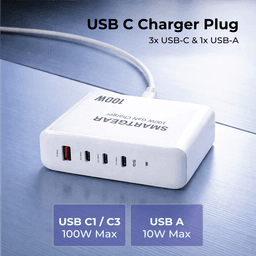
SmartGear 100W Desktop Station
- 4 ports · PD 3.1
- 3× USB-C + 1× USB-A
- Charges MacBook Pro
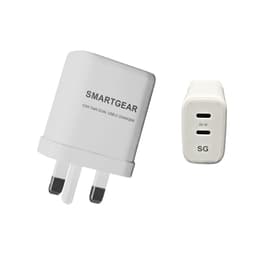
SmartGear 65W GaN Dual USB-C
- GaN III · Dual USB-C
- Samsung 45W PPS
- Foldable UK plug
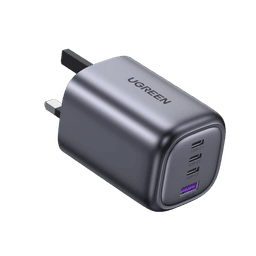
UGREEN Nexode 100W 4-Port
- 100W PD 3.1
- GaN III · Compact
- No coil whine
⚡ TL;DR — Our Verdict
- Your largest device is a MacBook Air, XPS 13, or similar ultrabook
- You mainly charge phones, tablets and earbuds
- You value portability and pocket-friendly size
- You want to save £15–20
- You own a MacBook Pro 16″, XPS 15/17 or similar 15″+ laptop
- You often charge a laptop + phone simultaneously
- You want future-proofing for upcoming high-power devices
- You don't mind 80–100 g extra weight
Full Head-to-Head Comparison
| Feature | 100W Charger | 65W Charger |
|---|---|---|
| Max single-port output | ✅ 100 W | 65 W |
| Typical UK price (GaN III) | £45–£70 | ✅ £30–£45 |
| Average weight | 210–230 g | ✅ 112–130 g |
| Average size | ~60 × 45 × 35 mm | ✅ ~50 × 37 × 31 mm |
| Number of ports | ✅ 3–4 ports | 2–3 ports |
| Dual-port split | ✅ 65 W + 30 W | 45 W + 20 W |
| MacBook Air M3 charge | Full speed (67 W) | Full speed (65 W ≈ 97%) |
| MacBook Pro 14″ charge | ✅ Full speed (96 W) | Near-full (65 W ≈ 68%) |
| MacBook Pro 16″ charge | ✅ Full speed (96–100 W) | Slow (65 W ≈ 65%) |
| Dell XPS 13 charge | Full speed | Full speed |
| Dell XPS 15/17 charge | ✅ Full speed | Slow / may not sustain under load |
| iPhone 16 Pro Max charge | Full speed (27 W) | Full speed (27 W) |
| Samsung Galaxy S25 Ultra | Full speed (45 W PPS) | Full speed (45 W PPS) |
| iPad Pro M4 charge | Full speed (45 W) | Full speed (45 W) |
| Steam Deck charge | Full speed (45 W) | Full speed (45 W) |
| Heat under max load | 50–55 °C | ✅ 45–52 °C |
| Travel-friendliness | Good (backpack) | ✅ Excellent (pocket) |
| Future-proofing | ✅ Better for next-gen devices | Adequate for current devices |
✅ = advantage in this category. Tie means identical performance.
Real-World Scenarios: Which Wattage Wins?
Student with MacBook Air + iPhone
Winner: 65WMacBook Air maxes at 67 W. A 65 W charger delivers 97% speed at half the cost. The iPhone charges identically on both.
Developer with MacBook Pro 16″ + phone
Winner: 100WThe MacBook Pro 16″ draws 96 W. A 65 W charger leaves you at 65% speed. 100 W delivers full-speed charging while coding.
Frequent traveller who values packing light
Winner: 65WAt 112 g vs 220 g, a 65 W charger is genuinely pocket-sized. For travel, 65 W covers phones, tablets and ultrabooks.
Home office with laptop + tablet + phone
Winner: 100W100 W splits to 65 W + 30 W — full laptop speed plus genuine fast charging for a phone. 65 W splits to only 45 W + 20 W.
Parent buying for teenager (school + phone)
Winner: 65WSchool Chromebooks and iPads draw 30–45 W. A 65 W charger handles any school device at full speed. Save the £15.
Creative professional editing 4K video
Winner: 100WVideo editing drains battery fast. Only 100 W keeps up with the power draw of a MacBook Pro 16″ or XPS 17 under load.
Frequently Asked Questions
Should I just buy 100W to be safe?
Not necessarily. A 65 W charger charges every phone, tablet, ultrabook and gaming handheld at full speed. The extra cost and weight of 100 W only pays off if you own a 15–17″ laptop like MacBook Pro 16″ or Dell XPS 15. If your biggest device is a MacBook Air or XPS 13, save £15–20 and buy 65 W.
Can a 65W charger charge a MacBook Pro 16″?
Yes, but slowly. The MacBook Pro 16″ draws 96–100 W at peak. A 65 W charger will charge it at about 65% of full speed — roughly 3 hours from empty instead of 2 hours. Under heavy load (video rendering, gaming), the laptop may drain faster than the 65 W charger can replenish.
Is there a noticeable difference for phone charging?
No. Every modern phone (iPhone, Samsung, Pixel, OnePlus) caps at 27–45 W. Both 65 W and 100 W chargers will charge your phone at exactly the same speed. The difference only manifests when charging laptops or dual-device charging.
Will a 100W charger damage my device?
No. USB Power Delivery negotiates the exact wattage your device needs. A 100 W charger will never push more than your device requests. It simply has more headroom, which only gets used by devices that need it.
What about dual-device charging? Does wattage matter?
Significantly. A 100 W charger splits to 65 W + 30 W across two ports — enough for a laptop at full speed plus a fast phone charge. A 65 W charger splits to 45 W + 20 W — the laptop charges more slowly and the phone gets a standard (not fast) charge.
Which cable do I need for each?
For 65 W: any standard USB-C cable rated for 60 W+ works (E-Marker not strictly required). For 100 W: you MUST use a cable with an E-Marker chip rated for 100 W / 5 A. Without it, the cable will cap at 60 W regardless of charger capability.
Related Guides
Best 65W Chargers UK
Top picks for ultrabooks & phones
Best 100W Chargers UK
Top picks for power users
GaN Charger Guide
How GaN III technology works
PD 3.1 Explained
USB Power Delivery 3.1 guide
GaN vs Standard Chargers
Is GaN worth the premium?
Charging Calculator
Calculate your exact charge time
Laptop Charging Guide
Wattage needs by model
USB-C Cable Guide
E-Marker cables for 100W