Best High-Capacity Power Banks UK 2026
200 W laptop charging, 25,000 mAh capacity, airline-safe. The power banks that replace your wall charger on the go — tested for MacBook Pro, Dell XPS, Samsung & iPhone.
⚡ Quick Picks
UGREEN Nexode 25000 mAh 200 W
25,000 mAh (90 Wh) · 200 W USB-C (PD 3.1)
Anker Prime 20000 mAh 200 W
20,000 mAh (72 Wh) · 200 W USB-C (PD 3.1)
Baseus Blade 2 25000 mAh 140 W
25,000 mAh (92.5 Wh) · 140 W USB-C (PD 3.1)
Both Top-Rated UGREEN Power Banks Available at SmartGear
Perfect for summer travel, festivals and camping. Order before 3 pm for same-day dispatch.
UGREEN Nexode 25000 mAh 200 W
- 25,000 mAh (90 Wh) · 200 W USB-C (PD 3.1)
- 2× USB-C (200 W + 100 W) + 1× USB-A (22.5 W)
- 520 g · Airline-safe ✅
- Best for: MacBook Pro 16″ / content creators / digital nomads
Free UK delivery · 12-month warranty
UGREEN Nexode 20000 mAh 145 W
- 20,000 mAh (72 Wh) · 145 W USB-C
- 2× USB-C (145 W + 45 W) + 1× USB-A (22.5 W)
- 430 g · Airline-safe ✅
- Best for: Everyday carry — laptop + phone backup
Free UK delivery · 12-month warranty
Why You Need a 200W / 25,000 mAh Power Bank
The standard 10,000 mAh phone power bank is dead for power users. In 2026, laptops charge via USB-C, and a high-capacity power bank with 140–200 W output has become the single most important accessory for anyone who works outside the home or office.
A 25,000 mAh, 200 W power bank delivers approximately 1.3 full charges to a MacBook Air, a full charge to a MacBook Pro 14″, or 5+ full charges to an iPhone 16. With PD 3.1 at 200 W, it charges a MacBook Pro 16″ at the same speed as a wall charger — something impossible with older power banks.
Crucially, every power bank on this page is airline-safe. At 90–92.5 Wh, they sit comfortably under the 100 Wh carry-on limit mandated by IATA, the UK CAA and virtually every global airline. Read our airline power bank rules guide for full details.
Prefer a specific brand? See how every model stacks up in our best Anker power banks UK guide — including the 250 W Prime that rivals these UGREEN units for laptop charging.
~5× iPhone or 1.3× MacBook Air
Full-speed MacBook Pro 16″ charging
Airline-safe carry-on approved
Shop High-Capacity Power Banks
In stock · Free UK delivery
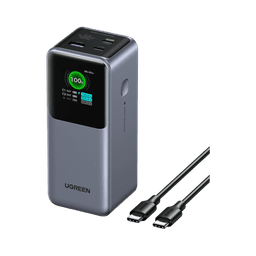
UGREEN 25000mAh 200W
- 200W PD 3.1 output
- 5–6 phone charges
- Airline-safe 90Wh
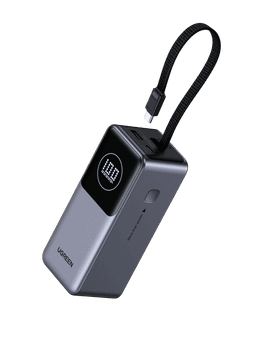
UGREEN 20000mAh 145W
- Built-in USB-C cable
- 4–5 phone charges
- 430g lightweight
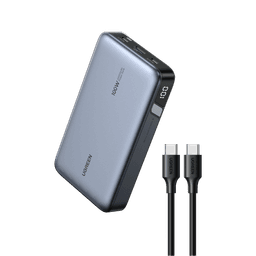
Browse UGREEN Power Banks
- 10K–48K mAh
- MagSafe options
- Laptop charging
Quick Comparison
| Category | Product | Key Specs | Price | Buy |
|---|---|---|---|---|
| Best Overall |  UGREEN 25000mAh 200W UGREEN 25000mAh 200W | 200W PD 3.1 · 3 ports · Airline-safe 90Wh | £59.99 | Buy → |
| Best Value |  UGREEN 20000mAh 145W UGREEN 20000mAh 145W | 145W · Built-in cable · 4-5 phone charges | £49.99 | Buy → |
| Best for Travel | UGREEN 20000mAh 145W | 430g · Airline-safe 72Wh · Built-in cable | £49.99 | Buy → |
| Best for Laptop | UGREEN 25000mAh 200W | 200W charges MacBook Pro 16" at full speed | £59.99 | Buy → |
| Best for iPhone |  Browse UGREEN MagSafe Browse UGREEN MagSafe | Qi2 15W · Magnetic snap · USB-C backup | From £28 | Buy |
Top 5 High-Capacity Power Banks — Full Reviews
Each power bank was tested for real-world output, recharge speed, heat management, and laptop charging performance over multiple charge cycles.
UGREEN Nexode 25000 mAh 200 W
Best for: MacBook Pro 16″ / content creators / digital nomads
Pros
- 200 W output via PD 3.1 — charges MacBook Pro 16″ at full speed on the go
- 25,000 mAh = 1.3× MacBook Air charges or 5× iPhone 16 charges
- Self-recharge in 65 min via 100 W input — fastest in its class
- Smart LED display shows per-port wattage and remaining capacity
Cons
- 520 g is heavy for a jacket pocket (fine for a backpack)
- £59.99 is excellent value for 200 W output — best price in its class
Free UK delivery · Ships from UK · 12-month SmartGear warranty
Anker Prime 20000 mAh 200 W
Best for: Professionals who want app control + premium build
Pros
- Anker app shows battery health, wattage, and charge cycles
- Aerospace-grade aluminium housing — premium feel and durability
- ActiveShield 2.0 thermal management for safe 200 W output
- Compact form factor despite 200 W capability
Cons
- 20,000 mAh is 5,000 mAh less than UGREEN at a higher price
- Anker app requires Bluetooth — unnecessary complexity for some
- £10 premium over UGREEN for less capacity
Baseus Blade 2 25000 mAh 140 W
Best for: Budget-conscious laptop charging on the go
Pros
- Best capacity-to-price ratio — 25,000 mAh for under £70
- 140 W charges MacBook Pro 14″ at near-full speed
- Ultra-thin blade design fits easily in laptop bags
- LED display with per-port wattage readout
Cons
- 140 W falls short for MacBook Pro 16″ (needs 96–100 W sustained)
- 65 W max input = 2+ hour recharge time (vs 65 min for 100 W input)
- Heavier than competitors at 545 g
UGREEN Nexode 20000 mAh 145 W
Best for: Everyday carry — laptop + phone backup
Pros
- Sweet spot of capacity, weight and price at £59.99
- 145 W charges most laptops at full speed (MacBook Air, XPS 13)
- Lightest in our roundup at 430 g — genuine EDC viability
- Pass-through charging while connected to a wall charger
Cons
- 145 W not enough for MacBook Pro 16″ at full speed
- 20,000 mAh = only 1 full MacBook Air charge
Free UK delivery · Ships from UK · 12-month SmartGear warranty
Anker 737 PowerCore 24000 mAh
Best for: Reliable high-capacity laptop backup
Pros
- 24,000 mAh — enough for 1.2× MacBook Air charges
- Anker's proven reliability with millions of units sold
- Smart digital display with remaining charge indicator
- Trickle-charge mode for earbuds and wearables
Cons
- 140 W limit means MacBook Pro 16″ charges slower than with 200 W
- £79.99 is close to UGREEN's 200 W model with less output
UGREEN Nexode 48,000 mAh 300 W Power Station
Best for: Home backup, camping, remote work stations & power-hungry laptops
Pros
- 300 W output — simultaneously charges two laptops at full speed
- 48,000 mAh = ~3× MacBook Pro 16" charges from a single bank
- Smart digital display shows per-port wattage and precise % remaining
- Compatible with all USB-C PD 3.1 devices including MacBook Pro 16"
Cons
- ⚠️ NOT airline-safe — 177 Wh far exceeds the 100 Wh carry-on limit
- Heavy at ~900 g — best as a desk/home backup, not daily carry
- Higher price (£110–200) reflects power station capability
As a UGREEN partner, SmartGear earns from qualifying purchases.
How Many Charges Will You Get?
| Device | Battery Size | 25,000 mAh | 20,000 mAh |
|---|---|---|---|
| iPhone 16 Pro Max | 4,685 mAh | ~4.5 charges | ~3.6 charges |
| Samsung Galaxy S25 Ultra | 5,000 mAh | ~4.2 charges | ~3.4 charges |
| iPad Pro M4 11″ | 8,686 mAh | ~2.4 charges | ~1.9 charges |
| MacBook Air M3 15″ | 66.5 Wh | ~1.2 charges | ~0.9 charges |
| MacBook Pro 14″ M3 | 72.4 Wh | ~1.0 charge | ~0.8 charges |
| MacBook Pro 16″ M3 | 100 Wh | ~0.75 charges | ~0.6 charges |
| Steam Deck | 40 Wh | ~1.9 charges | ~1.5 charges |
| AirPods Pro 2 | 523 mAh | ~40 charges | ~32 charges |
* Estimates account for ~15% energy loss during voltage conversion. Use our Charging Speed Calculator for precise estimates.
Power Up — Shop Power Banks Now
In stock · Free UK delivery
UGREEN 25000mAh 200W
- 200W PD 3.1 output
- 5–6 phone charges
- Airline-safe 90Wh
UGREEN 20000mAh 145W
- Built-in USB-C cable
- 4–5 phone charges
- 430g lightweight
Browse UGREEN Power Banks
- 10K–48K mAh
- MagSafe options
- Laptop charging
Frequently Asked Questions
Can I take a 25,000 mAh power bank on a plane?
Yes — all power banks on this page are airline-safe. UK airlines (and most international carriers) allow lithium-ion batteries up to 100 Wh (approximately 27,000 mAh at 3.7 V) in carry-on luggage without declaration. The 25,000 mAh models here are rated at 90–92.5 Wh, well within limits. Power banks are NOT allowed in checked luggage.
What does 200W output mean for a power bank?
200 W output means the power bank can deliver enough power to charge a MacBook Pro 16″ at its maximum charging speed — something only possible with PD 3.1 (Extended Power Range). Lower-output power banks (65 W, 100 W) can charge laptops but at reduced speeds, and some won't charge high-draw laptops at all under heavy use.
How many times will a 25,000 mAh power bank charge my phone?
Roughly 5–6 times for an iPhone 16 (3,561 mAh) or 4–5 times for a Samsung Galaxy S25 Ultra (5,000 mAh). Factor in ~15% energy loss during voltage conversion, so real-world capacity is approximately 21,000–22,000 mAh of usable charge.
What is the difference between 145W and 200W power banks?
The main difference is full-speed charging for large laptops. A 200 W power bank charges a MacBook Pro 16″ at its maximum 96–100 W draw. A 145 W power bank caps at 145 W but most 16″ laptops won't take more than 100 W from a portable source anyway. The real-world benefit of 200 W is future-proofing as laptops adopt PD 3.1. See our 145W vs 200W comparison for details.
How fast do these power banks recharge themselves?
Models with 100 W input (UGREEN 200 W, Anker Prime) recharge from 0–100% in about 65 minutes. Models with 65 W input (Baseus Blade 2, UGREEN 145 W) take 2–2.5 hours. If speed matters, choose a 100 W input model.
Can I charge my laptop while using it?
Yes — all power banks on this page support pass-through charging. However, be aware that a laptop under heavy load (video editing, gaming) draws more power, so the power bank will drain faster. For sustained laptop use, pair with a 100 W+ output power bank.
200W power bank or carry a wall charger?
Both is ideal. A 200 W power bank adds 1–2 full laptop charges when you're away from outlets — perfect for long flights, trains, or co-working spaces without enough sockets. But it doesn't replace a wall charger for overnight charging at your hotel or home.
Best power bank for a MacBook Pro?
For MacBook Pro 14″: The UGREEN 145 W (20,000 mAh, £49.99) delivers full-speed charging. For MacBook Pro 16″: The UGREEN 200 W (25,000 mAh, £59.99) is our Editor's Choice — full 100 W delivery and enough capacity for a complete recharge.
Related Guides
All Power Banks
Complete power bank buying guide
Read moreUGREEN Power Banks
UGREEN portable chargers reviewed & ranked
Read moreBest Power Banks for Summer
Travel, festivals & camping picks
Read moreAirline Power Bank Rules
UK & international flight regulations
Read more145W vs 200W Comparison
Which output do you need?
Read moreBest 100W Wall Chargers
Pair with your power bank
Read moreFestival Power Banks
Best picks for outdoor events
Read moreLaptop Charging Guide
Wattage requirements by model
Read moreCharging Speed Calculator
Calculate your exact charge time
Read moreUSB-C Cables
100W-rated cables for power banks
Read moreNot Sure Which Power Bank You Need?
Our Smart Finder recommends the perfect capacity and wattage based on your devices.