Laptop USB-C Charging Requirements: Every Model Listed
Find out exactly what wattage, cable type and PD version your laptop needs. We've compiled charging requirements for 20+ popular UK laptops — Apple, Dell, Lenovo, HP, ASUS and more.
Shop Laptop Chargers
65W–100W USB-C PD · CE/UKCA certified · Free UK delivery
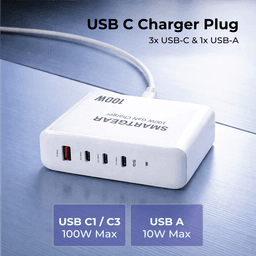
SmartGear 100W Desktop Station
- 4 ports · PD 3.1
- 3× USB-C + 1× USB-A
- Charges MacBook Pro
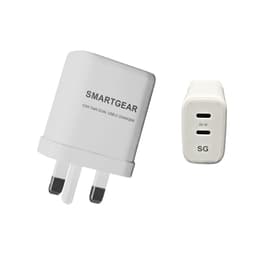
SmartGear 65W GaN Dual USB-C
- GaN III · Dual USB-C
- Samsung 45W PPS
- Foldable UK plug
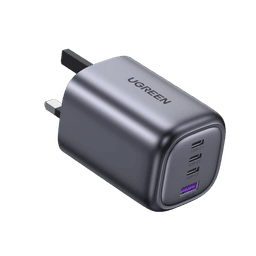
UGREEN Nexode 100W 4-Port
- 100W PD 3.1
- GaN III · Compact
- No coil whine
Quick Wattage Guide
30–65W
Ultrabooks & Light Laptops
MacBook Air, XPS 13, Surface Laptop, ThinkPad X1 Carbon, most 13–14″ laptops
65–100W
Performance Laptops
MacBook Pro 14″, XPS 15, 15″ business laptops, creative workstations
100–240W
Pro & Gaming Laptops
MacBook Pro 16″, XPS 17, ThinkPad X1 Extreme, ZBook, gaming laptops
Complete Laptop Charging Reference Table
Apple
| Model | Power Draw | Min Charger | PD Version | Cable | Notes |
|---|---|---|---|---|---|
| MacBook Air 13″ M3/M4 | 30–35 W | 30W+ | PD 3.0 | Standard USB-C | Any 30W+ charger is fine. Apple 35W dual port ideal. |
| MacBook Air 15″ M3/M4 | 52–67 W | 65W+ | PD 3.0 | Standard USB-C | 65W GaN charger is the sweet spot. |
| MacBook Pro 14″ M4 | 67–70 W | 65–100W | PD 3.0 | 100W E-Marker | 65W charges at near-full speed. 100W gives headroom for heavy tasks. |
| MacBook Pro 14″ M4 Pro | 70–96 W | 96–100W | PD 3.0 | 100W E-Marker | 100W charger recommended for full-speed charging. |
| MacBook Pro 16″ M4 Pro | 96–140 W | 100–140W | PD 3.1 EPR | 240W EPR cable | 100W works but slower. 140W for full speed via USB-C or MagSafe. |
| MacBook Pro 16″ M4 Max | 140 W | 140W+ | PD 3.1 EPR | 240W EPR cable | Needs PD 3.1 EPR charger or MagSafe 3 for full 140W. |
Dell
| Model | Power Draw | Min Charger | PD Version | Cable | Notes |
|---|---|---|---|---|---|
| XPS 13 (9345) | 45–60 W | 65W | PD 3.0 | Standard USB-C | 65W GaN charger is perfect. |
| XPS 14 (9440) | 60–65 W | 65W | PD 3.0 | Standard USB-C | 65W charges at full speed. |
| XPS 15 (9530) | 100–130 W | 100–130W | PD 3.0/3.1 | 100W E-Marker | 100W works. 130W+ for sustained creative workloads. |
| XPS 17 (9730) | 130 W | 130–140W | PD 3.1 | 240W EPR cable | PD 3.1 charger recommended for full speed. |
Lenovo
| Model | Power Draw | Min Charger | PD Version | Cable | Notes |
|---|---|---|---|---|---|
| ThinkPad X1 Carbon Gen 12 | 45–65 W | 65W | PD 3.0 | Standard USB-C | 65W GaN charger is ideal. Lenovo 65W Slim also works. |
| ThinkPad T14s Gen 5 | 45–65 W | 65W | PD 3.0 | Standard USB-C | 65W covers all scenarios. |
| ThinkPad X1 Extreme Gen 6 | 135–170 W | 140–170W | PD 3.1 EPR | 240W EPR cable | PD 3.1 EPR recommended. 100W works but charges slowly under load. |
HP
| Model | Power Draw | Min Charger | PD Version | Cable | Notes |
|---|---|---|---|---|---|
| EliteBook 840 G11 | 45–65 W | 65W | PD 3.0 | Standard USB-C | 65W covers everyday use. |
| ZBook Studio G11 | 150–200 W | 200W | PD 3.1 EPR | 240W EPR cable | High-performance workstation. PD 3.1 EPR essential. |
Microsoft
| Model | Power Draw | Min Charger | PD Version | Cable | Notes |
|---|---|---|---|---|---|
| Surface Laptop 6 | 39–60 W | 65W | PD 3.0 | Standard USB-C | 65W GaN charger works via USB-C. Surface Connect also supported. |
| Surface Laptop Studio 2 | 102 W | 100–140W | PD 3.0/3.1 | 100W E-Marker | 100W PD is sufficient. Surface Connect also available. |
ASUS
| Model | Power Draw | Min Charger | PD Version | Cable | Notes |
|---|---|---|---|---|---|
| ROG Zephyrus G14 (2025) | 100 W (USB-C) | 100W | PD 3.0 | 100W E-Marker | USB-C caps at 100W. Barrel plug for full 180W gaming performance. |
Steam
| Model | Power Draw | Min Charger | PD Version | Cable | Notes |
|---|---|---|---|---|---|
| Steam Deck / OLED | 45 W | 45W+ | PD 3.0 | Standard USB-C | Any 45W+ charger delivers full speed while gaming. |
Nintendo
| Model | Power Draw | Min Charger | PD Version | Cable | Notes |
|---|---|---|---|---|---|
| Switch 2 | 39–45 W | 45W+ | PD 3.0 | Standard USB-C | 45W charger recommended. Supports USB-C PD natively. |
Tip: When buying a third-party charger, choose one that matches or exceeds your laptop's recommended wattage. A higher-wattage charger won't harm your laptop — it simply has headroom for multi-device charging.
Frequently Asked Questions
What wattage charger do I need for my laptop?
Check the wattage printed on your laptop's included charger — that's your device's optimal wattage. Match it with a third-party USB-C PD charger of the same or higher wattage. Under-powering by 10–15W is usually fine for light use, but avoid going more than 30% below the recommended wattage.
Can I use a lower-wattage charger than recommended?
Yes, but with caveats. The laptop will charge more slowly, and under heavy load (video editing, gaming), it may drain battery faster than the charger can replenish. For a MacBook Pro 16″ (140W), a 65W charger works but charges at roughly half speed. A 100W charger is a reasonable compromise.
Will a higher-wattage charger damage my laptop?
No. USB Power Delivery negotiation ensures your laptop only draws what it needs. A 200W charger connected to a MacBook Air will deliver exactly 30W — the MacBook controls the negotiation. Higher-wattage chargers simply have more headroom for multi-device charging.
Do I need an E-Marker cable?
For 65W and below: No — standard USB-C cables work fine. For 65–100W: Yes — you need a cable with E-Marker chip rated for 5A/100W. For 100–240W: You need a 240W EPR cable. Using the wrong cable will cap your power at 60W regardless of the charger wattage.
Can I charge a gaming laptop via USB-C?
Most modern gaming laptops accept USB-C PD charging, but many cap USB-C input at 100W while needing 150–300W for full gaming performance. USB-C PD is great for light use and travel, but for gaming, you'll often need the included barrel-plug charger.
What about charging a laptop from a power bank?
Any USB-C PD power bank with sufficient wattage will charge a laptop. For MacBook Air: 30W+ power bank. For MacBook Pro 14″: 65–100W power bank. For MacBook Pro 16″: 100–200W power bank. Ensure the power bank capacity (Wh) gives you enough charge — a 90 Wh bank provides roughly one full MacBook Air charge.
Related Guides
Best 65W Chargers UK
Ideal for ultrabooks
Best 100W Chargers UK
For performance laptops
PD 3.1 Explained
240W power delivery guide
100W vs 65W Chargers
Which wattage fits?
Laptop Power Banks
Portable laptop charging
GaN Charger Guide
Compact laptop chargers
Universal Laptop Charger
One charger for all devices
USB-C Cable Guide
E-Marker & EPR cables