Is Fast Charging Bad for Your Battery? The Science-Based Answer (2026)
It's the question every smartphone owner has Googled: “Is fast charging bad for my battery?” The internet is full of contradictory advice — some say it's perfectly safe, others warn it'll destroy your phone in a year.
The real answer is nuanced. Fast charging does cause marginally more battery degradation than slow charging — but far less than most people fear, and modern phones have sophisticated protections that make the difference almost negligible. Here's what the science actually says.
Key Takeaways
- Fast charging is safe with a quality charger — it reduces battery lifespan by only 10–20% vs slow charging
- Heat is the real enemy, not speed — a cool 45W charge is better than a hot 10W charge
- Your phone protects itself — USB PD negotiation + thermal throttling prevent overcharging
- Charging to 80% extends battery life by 30–40% — use your phone's built-in charge limit
- Cheap chargers are the real risk — unregulated voltage causes heat damage regardless of wattage
In This Article
- 1.How Lithium-Ion Batteries Actually Work
- 2.What Fast Charging Does to Your Battery
- 3.Battery Degradation Data: The Numbers
- 4.6 Myths vs Facts About Fast Charging
- 5.The Heat Factor: Why Temperature Matters More
- 6.How Your Phone Protects Its Battery
- 7.Charging Protocols & Battery Safety
- 8.8 Charging Habits Ranked by Battery Impact
- 9.Practical Advice: What You Should Actually Do
- 10.FAQ: 10 Questions Answered
Charge Safely — The SmartGear Range
Why heat is the real problemAs the data below shows, it is not fast charging that kills a battery — it is heat, and cheap unregulated adapters that skip proper USB PD negotiation. Every charger we make is CE/UKCA certified with PD negotiation and over-temperature protection, and uses GaN, which runs cooler than silicon. Pick the lowest wattage that covers your devices and you land in a gentler heat band.

SmartGear 45W Super Fast Charger
Phones and tablets — the gentlest option here
- 3 ports · 2× USB-C + 1× USB-A
- PPS negotiation
- Compact GaN
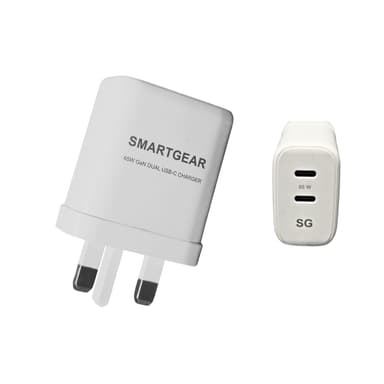
SmartGear 65W GaN Dual USB-C
One charger for a phone and a laptop
- GaN III · 2× USB-C
- Samsung 45W PPS
- Foldable UK plug
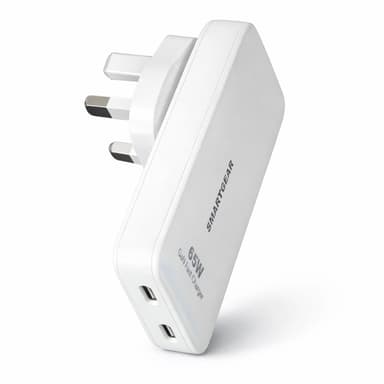
SmartGear 65W Travel Charger
Trips abroad — plugs built in, also in black
- 2× USB-C · PD 3.0
- Built-in UK + US plugs
- 15.5mm ultra-thin
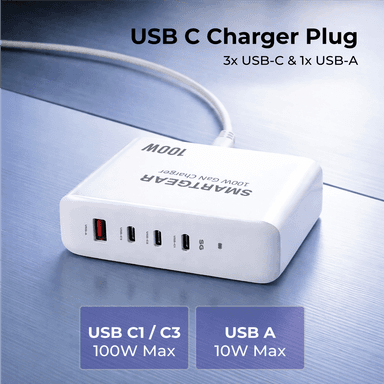
SmartGear 100W GaN Desktop Station
A laptop plus three more devices on a desk
- 4 ports · 3× USB-C + 1× USB-A
- 100W PD 3.1 single port
- Desktop housing
How Lithium-Ion Batteries Actually Work
Before we can answer whether fast charging is bad, you need to understand how lithium-ion batteries degrade. Every rechargeable battery in your phone, laptop, tablet, and power bank uses the same fundamental chemistry.
The Basics of Lithium-Ion
A lithium-ion cell contains two electrodes (anode and cathode) separated by an electrolyte. When you charge your phone, lithium ions travel from the cathode to the anode. When you use your phone, they travel back. Each journey is one “cycle” (or part of one). Over hundreds of cycles, the electrodes physically degrade — the anode develops a “Solid Electrolyte Interphase” (SEI) layer that thickens over time, trapping lithium ions and reducing capacity.
What Degrades Batteries
- • Number of charge cycles
- • Heat during charging (biggest factor)
- • Time spent at 100% or 0%
- • High current flow during charge
- • Calendar ageing (time alone)
What Preserves Batteries
- • Keeping charge between 20–80%
- • Cool temperatures while charging
- • Using certified chargers with PD/PPS
- • Enabling optimised charging features
- • Avoiding extreme temperatures
Typical Battery Lifespan
- • iPhone: 80%+ health at 500 cycles
- • Samsung Galaxy: 80%+ at 600 cycles
- • Most phones: 2–3 years of heavy use
- • Laptops: 3–5 years typical
- • Degradation is gradual, not sudden
The critical insight is that heat is the primary enemy of lithium-ion batteries — not the speed of charging itself. A cool fast charge is better for your battery than a hot slow charge. This is why charger quality matters more than wattage.
What Fast Charging Actually Does to Your Battery
Fast charging works by pushing more electrical current (amps) at higher voltage into your battery. More current = faster chemical reaction = faster charge. But there's a trade-off.
The Two-Phase Charging Curve
Every modern phone uses a two-phase charging strategy, regardless of charger wattage:
Phase 1: Constant Current (0–70%)
The charger delivers maximum power. This is where fast charging matters most — your phone goes from 0 to 70% at full speed. Battery stress is moderate because there's plenty of capacity remaining.
Phase 2: Constant Voltage (70–100%)
The phone automatically reduces charging speed as the battery fills. The last 30% takes almost as long as the first 70%. Battery stress increases above 80%, which is why charge-limit features help.
Key Insight: Fast charging mainly speeds up Phase 1 (0–70%). Phase 2 is already slow regardless of charger wattage. This is why a 45W charger only saves ~5 minutes over a 25W charger when going from 80% to 100%. The real time savings happen in the first hour.
So What's the Actual Battery Impact?
Higher current during Phase 1 causes two measurable effects:
1. More heat generation
Higher current through the battery's internal resistance (I²R losses) generates proportionally more heat. A 45W charge produces roughly 2× the internal heat of a 20W charge. Quality chargers mitigate this with efficient power conversion.
2. Faster SEI layer growth
Higher current accelerates the thickening of the SEI layer on the anode. This is the primary mechanism of capacity loss. However, the effect is logarithmic — doubling the charging speed does NOT double the degradation rate.
Battery Degradation Data: The Real Numbers
Here's what peer-reviewed research and manufacturer data tells us about how different charging speeds affect the number of cycles until a battery reaches 80% of its original capacity:
| Charging Method | Cycles to 80% | ~Years to Replace | Heat Level | Verdict |
|---|---|---|---|---|
| Slow Charging (5W) | 800–1,000 | 3.5–4.5 years | Very Low | Best for longevity, impractical for daily use |
| Standard Fast Charging (18–20W) | 700–900 | 3–4 years | Low–Moderate | Ideal balance — negligible battery impact |
| Fast Charging (25–45W) | 600–800 | 2.5–3.5 years | Moderate | Safe with good charger; avoid cheap adapters |
| Super Fast Charging (65–100W+) | 500–700 | 2–3 years | Moderate–High | Fine for laptops; phones rarely draw this much |
| Cheap/Unregulated Fast Charger | 300–500 | 1–2 years | High | Avoid — excessive heat accelerates degradation |
What This Data Actually Means
The difference between slow charging (5W) and standard fast charging (20W) is roughly 100 cycles — about 4–6 months of battery life. For most people who upgrade every 2–3 years, this is irrelevant.
The real danger isn't fast charging — it's cheap chargers. An unregulated charger can cut battery life in half by delivering unstable voltage that generates excessive heat.
Sources: Battery University (cadex.com), IEEE research papers on lithium-ion degradation, Apple & Samsung official battery documentation. Data represents typical ranges; individual results vary by device and usage patterns.
6 Myths vs Facts About Fast Charging & Battery Health
The internet is full of battery advice from 2015 that no longer applies. Let's separate outdated myths from current science:
"Fast charging destroys your battery within a year"
Modern phones with USB Power Delivery negotiate safe power levels. Research from Battery University shows fast charging (20–45W) reduces total cycle life by only 10–20% compared to slow charging — meaning your battery lasts 2.5–3.5 years instead of 3–4. Most people upgrade before this matters.
"You should always charge slowly overnight"
Overnight slow charging keeps the battery at 100% for 6+ hours, which actually causes more stress than a fast charge to 80% and unplug. Modern Optimised Battery Charging (Apple/Samsung) mitigates this, but a fast charge before bed is no worse than a slow trickle.
"Fast charging makes your phone dangerously hot"
A quality fast charger (Anker, UGREEN, Baseus) with USB PD keeps phone temperatures in the 35–42°C range — warm, not hot. The danger zone (45°C+) comes from cheap chargers without proper voltage regulation, or charging while gaming in a case.
"You should never use your phone while fast charging"
Using your phone during fast charging increases heat from both the screen/processor and the charging circuit simultaneously. Light use (messaging, browsing) is fine. Heavy use (gaming, video calls) during fast charging can push temperatures above 40°C — it's better to pause the heavy task or use a lower wattage.
"Wireless charging is gentler on the battery than fast wired"
Wireless charging is actually less efficient (75–85% vs 90–95% for wired), meaning more energy is wasted as heat. A 15W wireless charger generates roughly the same heat as a 25W wired charger. For battery longevity, efficient wired charging is slightly better — though the difference is marginal with quality chargers.
"Third-party chargers damage batteries more than official ones"
Certified third-party chargers (with UKCA/CE marks) from brands like Anker and UGREEN use the same USB PD protocol as official chargers. Your phone negotiates the same power regardless of brand. The risk comes from uncertified, unbranded chargers that may lack proper voltage regulation.
The Heat Factor: Why Temperature Matters More Than Speed
If there's one thing to remember from this article, it's this: heat is the #1 cause of battery degradation, and it matters far more than charging speed.
Temperature & Battery Degradation
Research from the Journal of The Electrochemical Society shows that operating a lithium-ion battery at 40°C instead of 25°C approximately doubles the rate of capacity loss. At 45°C, it's nearly tripled.
This is why charger quality matters more than wattage. A well-designed 45W GaN charger (93% efficient, 3–5W waste heat) is genuinely better for your battery than a cheap 10W charger (80% efficient, 2.5W waste heat in a tiny, poorly ventilated casing that traps heat against your phone).
Common Scenarios That Cause Dangerous Heat
Charging while gaming (CPU heat + charging heat)
Fix: Pause the game, or charge first then game
Charging in a hot car (40°C+ ambient)
Fix: Wait until the car cools, or use AC first
Charging with a thick case on
Fix: Remove case during fast charging sessions
Charging on a soft surface (bed, sofa)
Fix: Use a hard, flat surface for airflow
Using a cheap charger without PD negotiation
Fix: Switch to a certified USB PD charger from Anker, UGREEN, or Baseus
Stacking devices on a wireless charger
Fix: One device per charging pad
How Your Phone Already Protects Its Battery
Modern phones are not passive recipients of whatever power a charger throws at them. They have sophisticated battery management systems (BMS) that actively control charging. Here's what each major manufacturer does:
Apple (iPhone)
- Optimised Battery Charging — learns your schedule, pauses at 80%
- Charge limit option — cap at 80% or 85% manually
- Thermal management — reduces charging speed above 35°C
- Battery Health tracking in Settings > Battery > Battery Health
- Maximum charge rate negotiation via USB PD
Samsung (Galaxy)
- Adaptive Charging — slows charging during overnight sessions
- Protect Battery option — caps charging at 85%
- Temperature-aware charging — throttles at 42°C+
- Battery Health data in Samsung Members app
- Maximum 45W negotiation even with higher-wattage chargers
Google (Pixel)
- Adaptive Charging — delays full charge until your alarm
- Extreme Battery Saver integration with charging schedule
- USB PD 3.0 PPS negotiation for optimal voltage
- Thermal throttling at safe thresholds
OnePlus / OPPO
- SUPERVOOC manages battery as two cells — charges both simultaneously at lower individual stress
- Optimised Night Charging — holds at 80% until morning
- Battery Health Engine monitors 12 indicators in real time
- Temperature management keeps surface below 43°C during 100W+ charging
The Bottom Line on Phone Protections
Your phone is designed for fast charging. It will never accept more power than it can safely handle. When you plug a 100W charger into a phone that only supports 25W, the phone negotiates for exactly 25W. The charger doesn't force power — the phone requests it.
Charging Protocols & Battery Safety
Not all fast charging is created equal. The protocol your phone uses determines how safely it manages high-speed charging. Here are the major protocols and their battery safety features:
USB Power Delivery (PD)
Low — gold standard protocolUp to 240WVoltage and current negotiation between charger and device — device always controls what it receives
USB PD with PPS
Very Low — best for battery healthUp to 100W+Programmable Power Supply allows fine-grained 20mV voltage steps — reduces conversion heat in the phone
Qualcomm Quick Charge 5.0
LowUp to 100W+Battery Saver Technology monitors 14 parameters; automatic thermal balancing
Samsung Super Fast Charging
Low — Samsung is conservative by designUp to 45WRequires PPS for optimal voltage matching; Samsung limits max wattage to protect battery
Apple MagSafe / Qi2
Low — low wattage limits heatUp to 15WNFC handshake + foreign object detection + thermal cutoff
SUPERVOOC (OnePlus/OPPO)
Low–Moderate — high wattage offset by dual-cell designUp to 100W+Dual-cell battery splits current between two cells; 12-sensor monitoring
8 Charging Habits Ranked by Battery Impact
From best to worst — here's how your daily charging habits affect long-term battery health:
Charge to 80%, unplug
ExcellentLithium-ion batteries experience the most stress between 80–100% and 0–20%. Stopping at 80% can extend cycle life by 30–40%.
Keep between 20–80% daily
ExcellentThe "sweet spot" for lithium-ion chemistry. Apple and Samsung both recommend this range for maximum battery health.
Use optimised charging features
Very GoodiPhone's "Optimised Battery Charging" and Samsung's "Adaptive Charging" learn your routine and delay charging past 80% until you need it.
Fast charge during the day, slow overnight
GoodUse fast charging when you need it, switch to a lower-wattage charger for overnight. Modern phones handle this seamlessly.
Fast charge to 100% daily
AcceptableWith a quality charger and optimised charging enabled, the real-world impact is minimal. Most users' batteries still last 2.5–3 years.
Charge in a hot car or direct sunlight
PoorAmbient heat + charging heat is the #1 battery killer. Temperatures above 40°C during charging accelerate degradation exponentially.
Drain to 0% then charge to 100%
PoorDeep discharge cycles stress lithium-ion cells the most. This was good advice for nickel-cadmium batteries in the 2000s, not modern lithium-ion.
Use a cheap unbranded fast charger
HarmfulWithout proper USB PD negotiation and voltage regulation, cheap chargers can deliver unstable power that generates excessive heat and degrades cells faster.
Practical Advice: What You Should Actually Do
After all the science, here's the simple, practical guidance:
The 5 Rules That Actually Matter
1. Use a quality charger — this matters most
A certified charger from Anker, UGREEN, or Baseus with USB PD support is safe at any wattage. Avoid unbranded chargers from marketplace sites.
See our top-rated chargers2. Enable your phone's charge limit (80–85%)
This single setting extends battery life by 30–40%. iPhone: Settings > Battery > Charge Limit. Samsung: Settings > Battery > Battery Protection.
3. Remove your case during fast charging
Cases trap heat. If your phone feels warm during charging, remove the case to let it cool.
4. Don't charge in extreme heat
Avoid charging in direct sunlight, in a hot car, or on soft surfaces. Temperature matters more than speed.
More about heat & chargers5. Stop worrying about fast charging
With a quality charger and optimised charging enabled, the difference between fast and slow charging is a few months of battery life over 3+ years. Use fast charging freely — it's what your phone was designed for.
Chargers We Recommend for Battery-Conscious Users
Anker Nano 30W
GaN II, single USB-C, 55g. Delivers iPhone's maximum charging speed with minimal heat.
Anker GuideUGREEN Nexode 45W
GaN III, PPS support, 120g. Perfect match for Samsung's 45W Super Fast Charging with proper voltage negotiation.
UGREEN GuideAnker Prime 67W
GaN III, 3 ports, ActiveShield 2.0 temp monitoring. 93%+ efficiency = minimal waste heat.
GaN GuideFrequently Asked Questions
Does fast charging reduce battery lifespan?
Is it OK to fast charge my phone every day?
Should I charge my phone to 80% or 100%?
Is slow charging better for battery health?
Does wireless charging damage battery?
What temperature is dangerous when charging?
Can a 100W charger damage a phone that only supports 25W?
Is it bad to charge my phone overnight?
How do I check my phone's battery health?
Which fast charger is safest for battery health?
The Final Verdict
Is fast charging bad for your battery? Slightly — in the same way that driving a car at 70mph wears the tyres slightly faster than driving at 50mph. It's a real effect, but it's small, manageable, and designed into the system.
With a quality charger, your phone's built-in protections, and an 80% charge limit enabled, fast charging will cost you perhaps 4–6 months of battery life over a 3-year period. That's a worthwhile trade for getting 50% charge in 25 minutes instead of 2 hours.
The real battery killers are heat, cheap chargers, and extreme charge states (0% and 100%). Focus on those three things, and your battery will serve you well for years — regardless of how fast you charge.
Related Reading
Wireless vs Wired Charging: Which Is Better?
Speed, cost, and battery health compared — with real-world data
Why Most Fast Chargers Overheat
The science of charger heat and how to choose cooler-running chargers
Fast Charging vs Super Fast Charging
Understanding charging speeds and what your phone actually supports
Related Articles
Continue learning with these helpful guides
Why Most Fast Chargers Overheat (And How to Choose One That Doesn't)
Discover the science behind fast charger overheating. Learn about power conversion efficiency, thermal design flaws, and how to identify chargers with superior heat management.
Fast Charging vs Super Fast Charging: What's the Difference? (2026 Guide)
Understand the differences between fast charging standards, power delivery levels, and choose the right charger for your device's maximum charging speed.
Wireless vs Wired Charging (2026): Which Is Better? Speed, Cost & Battery Health
Data-driven comparison of wireless vs wired charging. Real-world speed tests, battery health impact, efficiency, and cost analysis for UK buyers.