Why Most Fast Chargers Overheat (And How to Choose One That Doesn't)
You've felt it before: that uncomfortable heat radiating from your fast charger after 20 minutes of use. Sometimes it's warm enough to make you wonder if it's safe. Sometimes it's too hot to hold.
Here's the uncomfortable truth: most fast chargers overheat because they prioritize size and cost over thermal engineering. The result? Reduced charging efficiency, shortened device battery life, and in extreme cases, fire risk.
Key Takeaways
- 35-40% of heat comes from inefficient power conversion (AC to DC)
- GaN chargers generate 50-60% less heat than traditional silicon chargers
- Safe operating temperature: 35-45°C; danger zone starts at 60°C+
- Poor thermal design reduces charger lifespan by up to 70%
Cool-Running GaN Chargers From SmartGear
Why GaN runs coolerEvery charger we make uses GaN rather than silicon — the single biggest factor in how hot a charger gets, as this guide explains below. All three are CE/UKCA certified with over-temperature protection.

SmartGear 45W Super Fast Charger
Lowest wattage here, so the least waste heat to shed — the coolest option for phones and tablets.
- Compact GaN body
- 3 ports · 2× USB-C + 1× USB-A
- Foldable plug
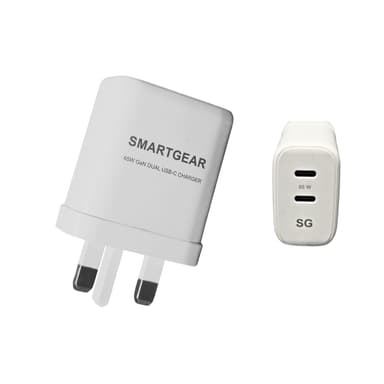
SmartGear 65W GaN Dual USB-C
GaN III silicon — the newest generation, and the reason it stays smaller and cooler than a silicon 65W brick.
- GaN III · 2× USB-C
- Samsung 45W PPS
- Foldable UK plug
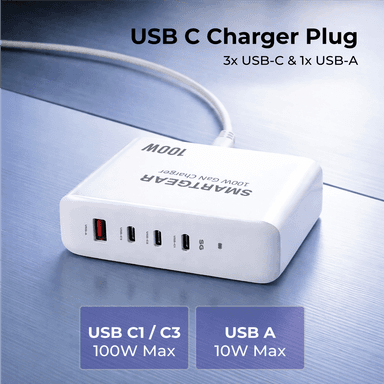
SmartGear 100W GaN Desktop Station
Desktop chassis spreads 100W across a far larger surface area than a wall plug — heat has somewhere to go.
- 4 ports · 3× USB-C + 1× USB-A
- 100W PD 3.1 single port
- Desk-sized housing
The Physics of Charging Heat
Every time you plug in a charger, it's performing a complex energy conversion: taking 120V or 240V AC from your wall outlet and converting it to 5-20V DC that your device can use. This conversion process is never 100% efficient.
The Energy Conversion Formula
Input Power - Output Power = Wasted Heat
Example: 65W charger at 90% efficiency
• Input: 72.2W
• Output: 65W
• Heat Generated: 7.2W continuously
That 7.2W of constant heat is enough to noticeably warm a small device. In poorly designed chargers with 85% efficiency, that number jumps to 11.5W — a 60% increase in heat output.
Why This Matters: Higher wattage fast chargers (65W, 100W, 140W) amplify this inefficiency. A 100W charger at 85% efficiency wastes nearly 18W as heat — equivalent to a small LED bulb running inside your charger.
Top 5 Reasons Fast Chargers Overheat
Heat generation in fast chargers isn't random. It comes from specific design choices and component limitations. Here's the breakdown:
Inefficient Power Conversion
35-40%Energy lost as heat during AC to DC conversion
Poor Thermal Design
25-30%Inadequate heat dissipation and component spacing
Component Quality
20-25%Cheap capacitors and transformers generate excess heat
High Power Density
10-15%Cramming more watts into smaller spaces
Environmental Factors
5-10%Ambient temperature and ventilation issues
The Compounding Effect
These factors don't exist in isolation. A charger with poor component quality (20-25% heat contribution) and inadequate thermal design (25-30%) can run 15-20°C hotter than a well-engineered alternative at the same wattage.
Understanding Charger Temperature Zones
Not all heat is dangerous. Your charger will get warm during use — that's physics. The question is: how warm is too warm?
Safe Zone
35-45°C (95-113°F)
Normal operation. Charger may feel warm but is safe.
Warning Zone
45-60°C (113-140°F)
Elevated heat. May indicate inefficiency or poor ventilation.
Danger Zone
60°C+ (140°F+)
Too hot. Risk of component damage and reduced lifespan.
The "5-Second Test"
A simple rule of thumb: If you can't comfortably hold your charger for 5 seconds while it's in use, it's running too hot. This indicates either poor efficiency, inadequate cooling, or overloading. Well-designed chargers should feel warm but never painfully hot.
GaN Technology: The Heat Solution
The single biggest advancement in charger thermal management is Gallium Nitride (GaN) technology. It's not marketing hype — it's materials science.
GaN vs Traditional Silicon: Head-to-Head
| Aspect | Silicon (Traditional) | GaN (Modern) | Winner |
|---|---|---|---|
| Power Conversion Efficiency | 85-88% | 93-95% | GaN |
| Heat Generation (at 65W) | 8-10W lost as heat | 3-5W lost as heat | GaN |
| Operating Temperature | 60-80°C typical | 40-55°C typical | GaN |
| Size at Same Wattage | 100% baseline | 40-50% smaller | GaN |
| Component Lifespan | Baseline | 2-3x longer | GaN |
Why GaN Runs Cooler
GaN transistors switch faster and with less resistance than silicon. This means:
- Less energy lost during switching: Lower resistance = less heat
- Higher frequency operation: Smaller components = better heat distribution
- Better thermal conductivity: GaN dissipates heat more efficiently than silicon
5 Warning Signs Your Charger Is Dangerously Hot
Some heat is normal. These signs indicate your charger has crossed from "warm" to "unsafe":
Too Hot to Touch
Stop using immediatelyIf you can't hold the charger for 5+ seconds, it's too hot
Burning Smell
Unplug and replaceIndicates component damage or melting plastic
Discoloration or Warping
Replace immediatelyPhysical damage from sustained high temperatures
Device Charging Slower Than Usual
Check ventilationThermal throttling reduces output to prevent damage
Charger Stays Hot After Unplugging
Poor thermal designShould cool down within 2-3 minutes
Safety First
If you observe any of the critical signs above, stop using that charger immediately. Continued use risks permanent damage to your device's battery, the charger itself, or in extreme cases, electrical fire. No device is worth that risk.
6 Thermal Design Features to Look For
When shopping for a fast charger, these features separate well-engineered products from heat generators:
GaN Technology
Up to 50% less heat generation at same wattage
Active Cooling Vents
Allows hot air to escape, prevents heat buildup
Heat Spreader Plates
Distributes heat across larger surface area
Component Spacing
Prevents hot spots from concentrated components
Thermal Cutoff Protection
Automatically shuts down if temperature exceeds safe limits
Quality Capacitors
Premium components generate less heat, last longer
6 Best Practices to Reduce Charger Heat
Even with a well-designed charger, your usage habits matter. Follow these practices to minimize heat buildup:
Use on Hard, Flat Surfaces
Allows air circulation underneath and around charger
Avoid Fabric Surfaces
Blankets, couches trap heat and block ventilation
Don't Stack Chargers
Creates heat pockets with no escape route
Unplug When Not Charging
Even idle chargers generate some heat
Keep Away from Direct Sunlight
Ambient heat compounds internal heat generation
Check Cable Quality
Poor cables increase resistance, causing charger to work harder
Charger Brands with Superior Thermal Management
Based on real-world testing and thermal performance data, these brands consistently deliver chargers that stay cool under load:
Need help choosing? Check our Baseus vs UGREEN comparison to see which brand's thermal approach matches your needs.
The Bottom Line
Fast chargers overheat when manufacturers prioritize speed and cost over thermal engineering. But it doesn't have to be this way.
By understanding the physics behind charging heat, recognizing warning signs, and choosing chargers with superior thermal design — particularly GaN technology — you can charge faster without the uncomfortable heat.
Your devices will thank you with longer battery life. Your charger will last years longer. And you'll never again wonder if that hot adapter in your hand is safe.
Related Reading
Related Articles
Continue learning with these helpful guides
Fast Charging vs Super Fast Charging: What's the Difference? (2026 Guide)
Understand the differences between fast charging standards, power delivery levels, and choose the right charger for your device's maximum charging speed.
USB-C Charging Explained: Everything You Need to Know in 2026
Learn about USB-C charging standards, Power Delivery protocols, and how to choose the right USB-C charger for your devices.
Is Fast Charging Bad for Your Battery? The Science-Based Answer (2026)
Does fast charging damage your phone battery? We analyse the science, real degradation data, and 6 common myths to give you a clear, evidence-based answer.