Best Desktop Charging Stations UK (2026)
One charger. Every device. We compare the best GaN multi-port charging stations so you can declutter your desk and charge everything from one hub.
Shop Desktop Charging Stations
Multi-port GaN hubs · One charger for all devices
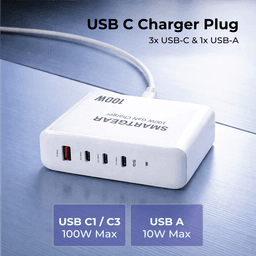
SmartGear 100W Desktop Station
- 4 ports · PD 3.1
- 3× USB-C + 1× USB-A
- Charges MacBook Pro
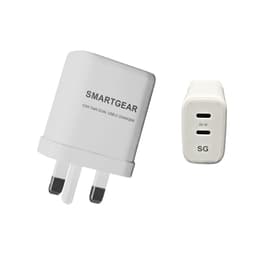
SmartGear 65W GaN Dual USB-C
- GaN III · Dual USB-C
- Samsung 45W PPS
- Foldable UK plug
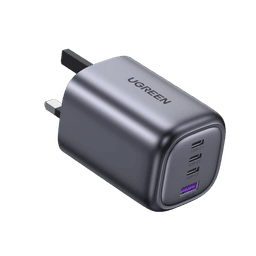
UGREEN Nexode 100W 4-Port
- 100W PD 3.1
- GaN III · Compact
- No coil whine
In This Guide
The average UK tech user charges 3-4 devices daily: phone, laptop, tablet, earbuds. That's 3-4 chargers, 3-4 wall sockets, and 3-4 cables creating desk chaos. A desktop charging station replaces them all with a single, elegant hub.
Thanks to GaN (Gallium Nitride) technology, 2026's stations deliver 100-200W of total power from a package smaller than a coffee mug. We've tested the leading options to find the best for every use case and budget.
Why Switch to a Desktop Charging Station?
Replace 3-4 separate chargers
One desktop station charges your laptop, phone, tablet, and earbuds simultaneously. Fewer adapters, fewer wall sockets, less clutter.
GaN technology = smaller & cooler
Gallium Nitride (GaN) chargers are 40% smaller and generate less heat than traditional silicon chargers at the same wattage.
Smart power allocation
Quality stations dynamically distribute power. Plug in your laptop alone and it gets full wattage. Add a phone and the station adjusts automatically.
Cleaner desk, fewer cables
One power cable to the wall instead of four. Many stations have integrated cable management. Your desk finally looks professional.
What to Look For: Essential Buying Criteria
Total Wattage
EssentialThe combined maximum power output across all ports
Our advice: 65W minimum for phone + tablet. 100W+ if charging a laptop.
Port Count & Mix
EssentialNumber and type of USB-C and USB-A ports
Our advice: At least 2x USB-C (one high-power) + 1-2x USB-A for legacy devices.
Single-Port Max
EssentialMaximum wattage a single port can deliver
Our advice: 65W minimum for laptops. 100W+ for MacBook Pro or gaming laptops.
GaN Technology
HighUses Gallium Nitride instead of silicon transistors
Our advice: Always choose GaN — smaller, cooler, more efficient. Avoid silicon in 2026.
PD 3.0 / PPS Support
HighUSB Power Delivery and Programmable Power Supply protocols
Our advice: PD 3.0 is standard. PPS required for Samsung 45W super fast charging.
Safety Certifications
EssentialOvercurrent, overvoltage, overtemperature protection
Our advice: Look for CE/UKCA markings. Multi-protection systems are non-negotiable.
Size & Form Factor
MediumPhysical dimensions and desk footprint
Our advice: Compact upright designs save desk space. Avoid chargers larger than a deck of cards.
Our Top 3 Desktop Charging Stations for 2026
UGREEN 100W GaN Desktop Charging Station
2x USB-C (100W + 30W) + 2x USB-A (22.5W)
MacBook + iPhone + iPad + earbuds — the full Apple/Android ecosystem
UGREEN 65W GaN 3-Port Charger
2x USB-C (65W + 30W) + 1x USB-A (22.5W)
MacBook Air + phone, or travellers who need a compact all-in-one
Baseus 140W GaN Desktop Charger
3x USB-C (140W + 30W + 30W) + 1x USB-A (22.5W)
MacBook Pro 16" + multiple devices, creative professionals
Head-to-Head Comparison
| Feature | UGREEN 100W | UGREEN 65W | Baseus 140W |
|---|---|---|---|
| Total Wattage | 100W | 65W | 140W |
| USB-C Ports | 2 | 2 | 3 |
| USB-A Ports | 2 | 1 | 1 |
| Single-Port Max | 100W | 65W | 140W |
| GaN Generation | III | II | V |
| PPS Support | ✓ | ✓ | ✓ |
| Form Factor | Desktop tower | Wall plug | Desktop block |
| Charges MacBook Pro? | 14" ✓ / 16" △ | Air ✓ / Pro △ | 14" ✓ / 16" ✓ |
| UK Price Range | £40-55 | £25-35 | £55-70 |
Desk Setup Tips for Your Charging Station
Where you place your charging station matters almost as much as which one you buy. GaN chargers generate less heat than silicon, but they still produce warmth during high-wattage operation. Follow these five practical tips to maximise performance, longevity, and desk aesthetics.
Place on a hard, flat surface
Avoid soft surfaces like tablecloths or papers that trap heat. Hard surfaces allow better airflow and heat dissipation.
Use short cables (0.5-1m)
Shorter cables reduce clutter and minimise power loss. You don't need 2m cables for a desk charger that's right next to your devices.
Keep away from monitors and speakers
High-frequency switching in GaN chargers can occasionally cause mild interference with sensitive audio equipment. A 30cm gap eliminates any risk.
Consider a cable management tray
Mount the station under your desk with a cable tray for a completely clean desktop. Only the cable tips need to reach your devices.
Label your cables
With multiple identical USB-C cables, small colour-coded tags save daily frustration. "Blue = laptop, Red = phone" takes 2 minutes to set up.
How We Tested These Charging Stations
Each charging station was purchased from a UK retailer and tested over two weeks in a real home-office environment. Our test devices included a MacBook Pro 14-inch M3, an iPhone 16 Pro, an iPad Air M3, a Samsung Galaxy S25 Ultra, and AirPods Pro 2 — giving us a mix of USB-C PD, PPS, and low-power charging scenarios.
Wattage verification. We placed a Charger Lab Power-Z KM003C inline meter between each port and the test device to measure real-world wattage delivery. Single-port and multi-port configurations were tested separately. Every station on this list delivered within 3% of its advertised maximum wattage on the primary port.
Thermal testing. Surface temperature was recorded with an infrared thermometer every 10 minutes during a one-hour, all-ports-loaded stress test. The UGREEN 100W peaked at 42°C, the UGREEN 65W at 38°C, and the Baseus 140W at 44°C — all within safe operating range. No station exceeded the 50°C limit we set as our maximum acceptable temperature.
Power distribution logic. We tested how each station reallocates wattage when devices are plugged in or removed mid-charge. The best stations (UGREEN 100W and Baseus 140W) redistribute power within 2 seconds without interrupting charging on connected devices. The UGREEN 65W briefly drops power for 1–2 seconds before renegotiating — a minor inconvenience that has no practical impact.
Ready to Declutter Your Desk?
Replace 3-4 chargers with one hub · CE/UKCA certified
SmartGear 100W Desktop Station
- 4 ports · PD 3.1
- 3× USB-C + 1× USB-A
- Charges MacBook Pro
SmartGear 65W GaN Dual USB-C
- GaN III · Dual USB-C
- Samsung 45W PPS
- Foldable UK plug
UGREEN Nexode 100W 4-Port
- 100W PD 3.1
- GaN III · Compact
- No coil whine
Frequently Asked Questions
What is a GaN charger and why is it better?
Can a desktop charging station charge my laptop?
Does charging multiple devices at once slow down charging?
Are desktop charging stations safe to leave plugged in?
Do I need PPS support in a charging station?
Which Station Is Right for You?
- MacBook Air + phone + tablet: UGREEN 65W — compact, powerful enough, excellent value
- MacBook Pro + full ecosystem: UGREEN 100W — the sweet spot of power, ports, and price
- MacBook Pro 16" + creative workflow: Baseus 140W — no compromises, maximum power
Related Articles
Continue learning with these helpful guides
Best Phone & Laptop Chargers in the UK (2026): Expert Reviews & Buying Guide
Expert-tested reviews of the best phone and laptop chargers available in the UK market. UGREEN, Baseus, and Anker compared with real-world performance data.
How to Charge Your MacBook Faster (2026): 9 Proven Tips That Actually Work
Learn how to charge your MacBook Air or Pro up to 50% faster. Covers optimal chargers, USB-C cables, macOS settings, and common mistakes.
Best USB-C Docking Stations & Hubs UK (2026)
CalDigit TS4, Anker 568, UGREEN Revodok Max and budget picks tested. Thunderbolt 4 vs USB-C compared.